
Guides · Updated August 25, 2026
How to read a DODA PDF receipt
The acuse (the receipt) of a DODA is the page your driver carries, printed or on a phone, when the truck reaches the customs module in Mexico. Most people use it for exactly one thing: getting it scanned. But the PDF carries nine values you need in order to track the crossing, to confirm that what is in the trailer is what was declared, and to push back when something does not add up. Here is every field, in the same order they are numbered in the illustration. The form is issued in Spanish only, so each Spanish label comes first below.
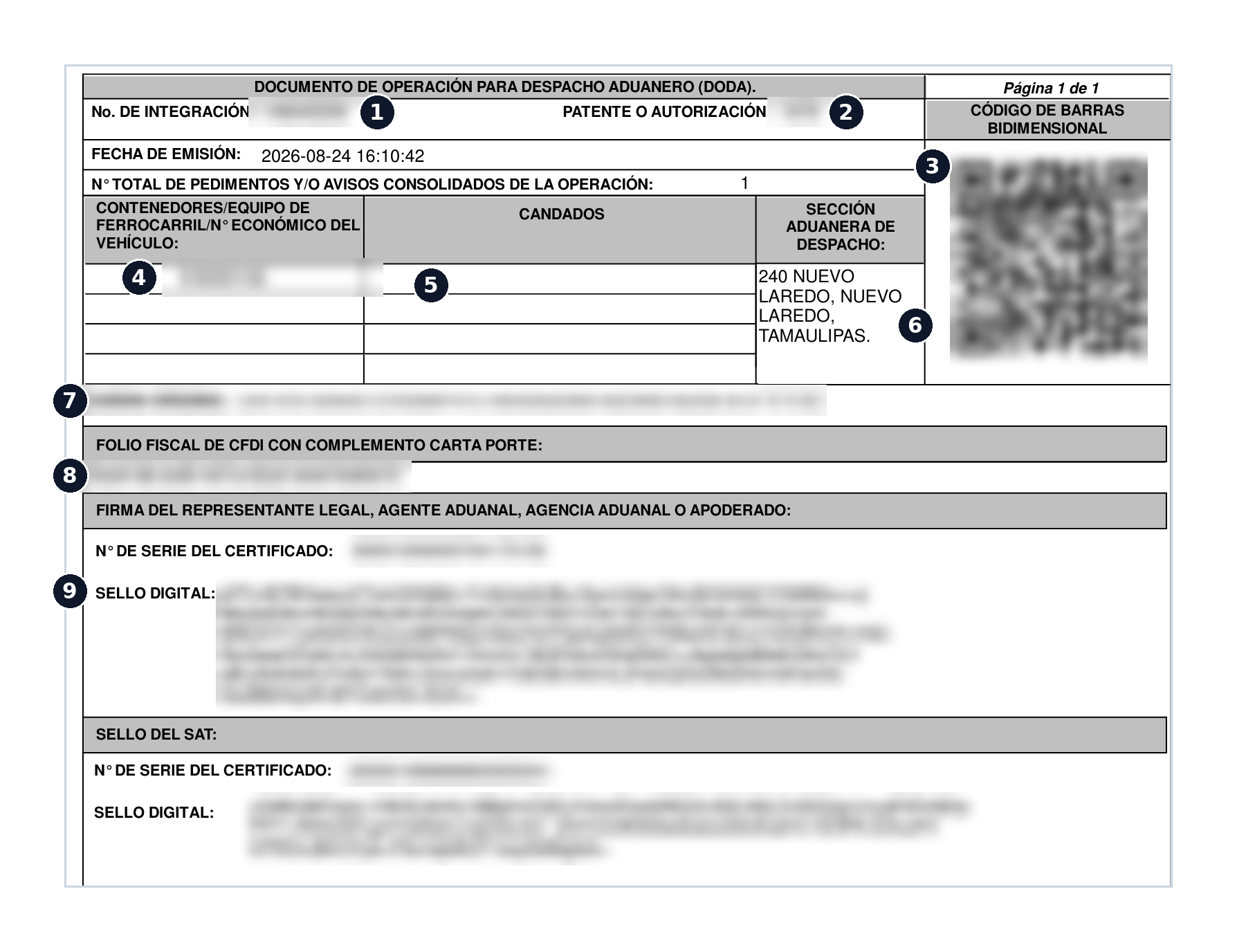
1. No. de integración (integration number)
The unique identifier the SAT system assigned to this DODA when the customs broker transmitted it. Nobody picks it, it cannot be derived from the pedimento, and it cannot be reconstructed: if you do not have it, you have to ask. It is also the only value that lets you look up the status of the crossing, so if you memorize one field on this page, make it this one. Full detail in what the integration number is.
When you type it, watch the usual suspects: zero versus letter O, one versus lowercase L, five versus S. The SAT portal does not correct or suggest anything, it just reports that nothing was found. Copy and paste from the PDF whenever you can.
2. Patente o autorización (broker patente)
The four characters identifying the customs broker (agente aduanal) handling the clearance, or the authorization number of a company customs attorney (apoderado aduanal) when the operation runs that way. It repeats across every shipment that broker handles, so it tracks nothing on its own. What it does give you is practical: whose office to call when the integration number comes back empty or when a value on the document has to be corrected.
3. Código de barras bidimensional (the QR code)
This is what gets scanned at the module to trigger the automated selection mechanism, in other words to run the traffic light. The QR does not hold cargo details: it holds a link to the SAT validator with the integration number inside it. That is useful in two directions. If the receipt reached you as a phone photo with the header cut off, scan the QR with a camera and read the number out of the URL. And in reverse: whoever has the QR has the integration number, even if the rest of the page is covered.
4. Contenedores, equipo de ferrocarril o N° económico (container, rail car or unit)
Depending on the mode, this holds the container number, the rail car number, or the tractor unit number. It is the physical link between the paperwork and what is actually in the yard, so check it against the equipment before the truck leaves. A mistyped container number is not caught by any system: it is caught by the officer at the module, which is the worst possible moment to find out.
5. Candados (security seals)
The declared seal numbers, exactly as they were applied. If the seal on the container does not match the one printed here, do not correct it by hand and do not let it ride: tell the broker so the document is regenerated. A seal discrepancy turns into a formal incident the moment anyone checks it, and it also raises questions about what happened to the cargo on the way.
6. Sección aduanera de despacho (clearing customs section)
The code and name of the customs office and section the shipment will clear through. In the example above, 240 Nuevo Laredo, Tamaulipas. Always verify it: if the receipt says one port and the driver is heading to another, the DODA is useless there and has to be redone, with all the lost time that implies. The codes come from the official catalogue, listed in Mexican customs offices.
7. Cadena original (the original chain)
That dense block of text with everything separated by pipe characters is the literal representation of what was transmitted to the SAT. It concentrates the same fields you already saw above: customs office and section, patente, pedimento or COVE number, integration number, container and date. It is the backup copy of the integration number when the header is blurred or cut off, and it is where you verify at a glance that the declared data is what you think it is. Read it slowly once and the whole document makes sense.
8. Folio fiscal del CFDI con complemento Carta Porte
A hyphenated UUID pointing to the Mexican electronic invoice (CFDI) that covers the domestic transport leg. It is not the integration number and will not look up a DODA, but it is what gets requested if the load is checked on the highway. Mixing up the two identifiers is a classic when somebody asks for "the number" over WhatsApp without saying which one.
9. Sellos digitales y números de serie del certificado (digital signatures)
At the foot of the page sit two electronic signatures with their certificate serial numbers: the one from the legal representative or customs broker, and the one from the SAT. They are proof the document came out of the system rather than out of somebody's word processor. A receipt with no signature block is not a receipt. And because they are electronic identity data, they have no business circulating: do not post them and do not forward them to anyone who does not need the full document.
Two more values with no number
- Issue date and time. Always in Mexico central time. Worth flagging if you cross at Tijuana, Nogales or Ciudad Juárez, where local time runs behind: the timestamp on the document is not your clock, and that gap is behind plenty of arguments about whether a DODA was generated before or after the truck showed up.
- Total number of pedimentos and/or consolidated notices. How many declarations this single crossing covers. When that count is greater than one you are looking at a consolidated load, and the receipt usually runs several pages listing them. It is exactly why a DODA is not the same thing as a pedimento: pedimento vs DODA.
What to redact before sharing the receipt
The receipt bounces around WhatsApp and email all day between the brokerage, the carrier, the driver and the end client. Before forwarding it to somebody outside the operation, keep two things in mind. First: the QR and the cadena original both contain the integration number, so covering the header hides nothing if you leave those two blocks visible. Second: the receipt also exposes the patente, the container, the seals and the customs section, meaning who is clearing, which unit is moving and where it crosses.
- If somebody only needs to identify the crossing, send the integration number as text rather than the full PDF.
- If you are publishing or sharing the page as an example, blur the integration number, the QR, the original chain and the digital signatures.
- To let a client follow progress without handing over the document, a read-only link with the live status is the better move.
And keep the limits of the paper in mind: the receipt is a snapshot of the moment it was generated. It does not change, it does not refresh, and it never tells you anything. Everything that happens afterwards (modulation, the green light, the red light, the physical inspection) lives in the SAT system. The manual lookup steps are in how to check your DODA status.
Let DODA.mx watch the SAT for you
Drag the receipt PDF into DODA.mx and the integration number is pulled out for you, no typing. From then on we alert you by email, browser or WhatsApp every time the SAT changes the status.
Create free accountUp to 3 active DODAs free. No credit card.